
Delaware company search helps users find public business records and review information connected with Delaware entities. An annual report search can be useful for checking whether a corporation has submitted its required report and reviewing related filing details. Delaware Annual Report Search & Lookup covers the basic process for finding business records through official state resources. This page explains where annual report information may appear, what details users can expect to see, and how annual filing records relate to Delaware business registration and corporate compliance requirements.
Delaware company search provides a starting point for locating business records maintained by Delaware state agencies. Annual report records can help users review filing information associated with corporations registered in Delaware. Delaware Annual Report Search & Lookup explains the available record types, search options, filing details, and important differences between entity records and annual report information. Readers can use this information to identify the appropriate Delaware state resource, check relevant filing records, and see how annual reports connect with corporate registration requirements and Delaware filing obligations.
Can You Search for a Delaware Company Annual Report Online?
A Delaware annual report online search can help you find basic company filing details, but the information shown depends on the type of record you need. A Delaware company search can help identify the relevant business entity before reviewing annual report information. A Delaware annual report search may show filing-related information connected with a business entity, such as filing dates, tax assessment details, and recent filings. A Delaware annual report lookup is different from obtaining a copy of the actual annual report document. The Delaware Division of Corporations provides online entity information, yet its public search results do not display scanned images or copies of annual-report filings.
How to Search a Corporation for Its Annual Report
A Delaware corporation search can help you identify a business entity before checking its available filing information. The Delaware Division of Corporations allows users to search a business entity by company name or Delaware file number. Free entity information can include the entity name, file number, incorporation or formation date, registered agent details, entity type, kind, and residency. A separate online status option provides current status and more detailed filing information for a fee.
- Delaware Online Status:
- https://corp.delaware.gov/onlinestatus/
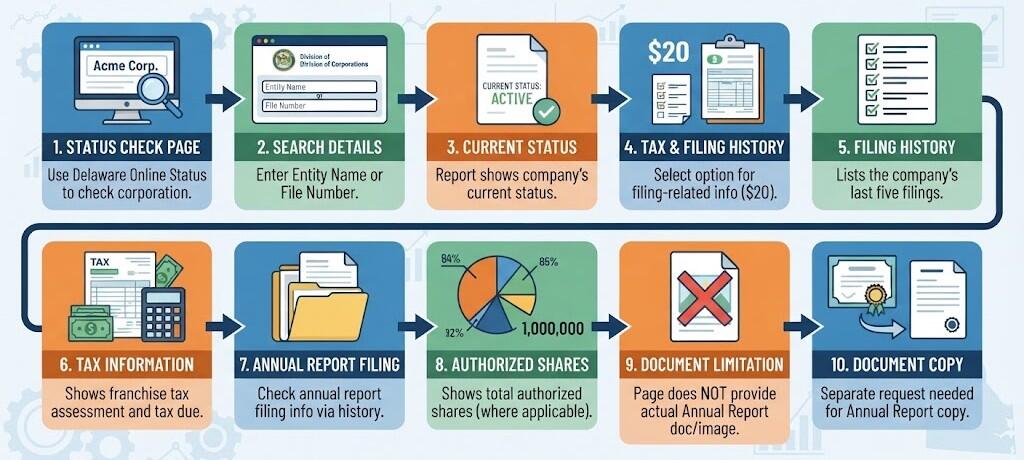
- Status Check: Delaware Online Status can be used to check a corporation’s status.
- Search Details: A Delaware entity name or file number may be needed for the search.
- Current Status: The Online Status report can show the company’s current status.
- Tax & Filing History: The $20 Status with Tax & History option provides filing-related information.
- Filing History: The report can list the company’s last five filings.
- Tax Information: The report can show the franchise tax assessment and tax due.
- Annual Report Filing: The corporation’s annual report filing information can be checked through its filing history.
- Authorized Shares: Where applicable, the report can show the total number of authorized shares.
- Document Limitation: The Online Status page does not provide the actual Annual Report document or image.
- Document Copy: A copy of the filed Annual Report requires a separate request through Delaware’s Document Filing and Certificate Request Service.
How to Get a Copy of a Delaware Annual Report
If you need a copy of a corporation’s filed annual report, Delaware directs users to its Document Filing and Certificate Request Service. The Online Status system can show filing history and other corporate information, but its $20 Status with Tax & History option does not provide images of documents on record. A separate document request is needed when you want the actual corporate filing rather than filing-history information.
Use Delaware’s Document Filing and Certificate Request Service
The Delaware Division of Corporations provides the Document Filing and Certificate Request Service for submitting requests for business entity documents and certificates. The service is a request-submission system; it does not provide direct online retrieval of business entity documents. Delaware specifically states that users who require a copy of an annual report filing should submit the request through this service. For a specific annual report copy, select the appropriate document request option and provide the information needed to identify the corporate filing. The request is reviewed and processed by Division staff rather than being delivered instantly through the website.
- Delaware Document Filing and Certificate Request Information:
- https://corp.delaware.gov/document-upload-service-information/
- What It Does: The service allows users to electronically submit business entity filing, document, or certificate requests.
- Annual Report Copy: If you need a copy of a filed Delaware Annual Report, this service can be used to submit the relevant document request.
- Online Viewing: This page is not a direct online viewing or downloading service for previously filed Annual Reports.
- How It Works: You do not simply open an old Annual Report from this page. Instead, you submit a document request through the available process.
- Fees: The service provides information about document requests, but the applicable fee depends on the type of document or certificate requested.
- Payment: Charges are handled as part of the request process, with billing information provided for completed requests.
- Where to Submit: To submit a request, use eCorp Business Services and select “Document Filing and Certificate Request.”
- My eCorp Account: A My eCorp account can save submitter information and pre-populate certain parts of the request form.
- Operating Hours: The service has stated operating hours and may be unavailable during weekends, state holidays, or unexpected closures.
Information You May Need
A document request should clearly identify the corporate filing you want. Delaware recommends stating the type of document or information requested and including relevant dates when requesting a specific filing. The entity name and other identifying details can help identify the correct official record. Additional information can be entered in the comments section when needed.
When a Document Copy Is Different From Entity Status
An entity status result and an annual report copy serve different purposes. The $20 status result can list the current status, last five filings, franchise tax assessment, authorized shares when applicable, and tax due. It does not show the document image. An official document request is the appropriate route when you need the actual filed annual report rather than a summary of its filing history.
Can You View a Filed Annual Report?
A filed annual report is part of a corporation’s official filing record, but Delaware’s online status search does not display the actual report document. The Delaware Division of Corporations states that its $20 Status with Tax & History option returns information such as the entity’s status, last five filings, franchise tax assessment, total authorized shares when applicable, and tax due. It does not return actual images of documents on record.
Free Entity Search Does Not Show the Annual Report
A Delaware entity search is useful for locating basic corporate information, such as the entity name and file number. This type of search should not be treated as a way to view an annual report copy. Finding a corporation in the state records and viewing its filed documents are separate functions. The search result can help identify the correct corporate record, but it does not display the complete annual report document.
Status Search Does Not Display the Document Image
The Delaware Online Status system provides status and filing-related details. The $20 Status with Tax & History option can list the last five filings, giving users information about filings associated with the corporation. The state confirms that this result does not include the actual document image. Officer and director names and addresses maintained on annual report images are not available through this application.
Does the Status Result Include a Document Copy?
The $20 status/history result is different from an annual report copy. It provides filing and tax information, but it does not provide an image of the filed document. This distinction matters when a user needs to review the complete official filing rather than confirm that an annual report appears in the corporation’s filing history.
How to Request a Filed Annual Report Copy
If you need an actual copy of a corporation’s filed annual report, Delaware directs users to its Document Filing and Certificate Request Service. The state states that this process is used to submit document and certificate requests, rather than providing direct online retrieval of business entity documents. For a specific filing, the request should identify the type of document and relevant dates.
Delaware Annual Report Online Filing
Delaware annual report online filing allows corporations to submit their required annual report and pay the applicable franchise tax through Delaware’s electronic services. The online filing process is handled through eCorp, Delaware’s electronic corporate filing system. A corporation can use the Delaware annual report login process to identify its record, enter or update the required information, review the filing, make the required payment, and submit the report. Keeping the confirmation after submission can help document that the annual report filing was completed.
- Delaware eCorp Annual Report Filing Portal:
- https://icis.corp.delaware.gov/ecorp/logintax.aspx
Access Delaware eCorp
Start by visiting Delaware’s official eCorp system and selecting the appropriate option for annual report filing. The filer may need the corporation’s identifying information and account credentials, depending on the filing process. The Delaware annual report online system connects the filing to the corporation’s record maintained by the Division of Corporations.
Identify the Corporation
The next step is to locate the correct corporation record. The corporation’s name or Delaware file number can help identify the appropriate business entity. Check the entity information carefully before continuing so the annual report is associated with the correct corporate record.
Enter or Update Annual Report Information
Enter the information requested for the annual report filing. This may include corporate details, principal information, officer or director information, and other required fields. Review existing information and update any fields that require changes.
Pay the Required Amount
The online filing process includes payment of the required franchise tax and applicable filing amount. The amount can vary based on the corporation’s filing and tax requirements.
Submit the Annual Report
After reviewing the information and completing payment, submit the annual report through eCorp. A successful submission completes the online filing process.
Annual Report Fees and Franchise Tax
Delaware corporations may have two separate amounts connected with their Annual Report: an annual report filing fee and franchise tax. The filing fee is charged for submitting the Annual Report, whereas franchise tax is the annual tax imposed on corporations. The amount of franchise tax depends on the corporation’s stock structure and the calculation method used. Delaware provides two methods for calculating franchise tax: the Authorized Shares Method and the Assumed Par Value Capital Method.
Annual Report vs Franchise Tax
A Delaware annual report and franchise tax are separate requirements that can be handled together for certain corporations, but they serve different purposes. An annual report is a filing and information requirement. It provides the Delaware Division of Corporations with updated details about the corporation, such as its officers, directors, address, and other required information. The report confirms that the corporation is providing its required information for the applicable filing period.
Frequently Asked Questions
Delaware annual report searches, company name searches, file number searches, online filing records, and the availability of annual report documents. It explains what information can be found through Delaware corporate records and when a separate document request may be needed.